Botly: a local RAG chatbot
A private chatbot that answers from your own PDFs. It runs entirely on your machine with Ollama, LangChain, FAISS and Streamlit, packaged in one Docker image.
- state
- healthy
- stage
- evergreen
- status
- open source
- started
- 2025.01
- source
- github ↗
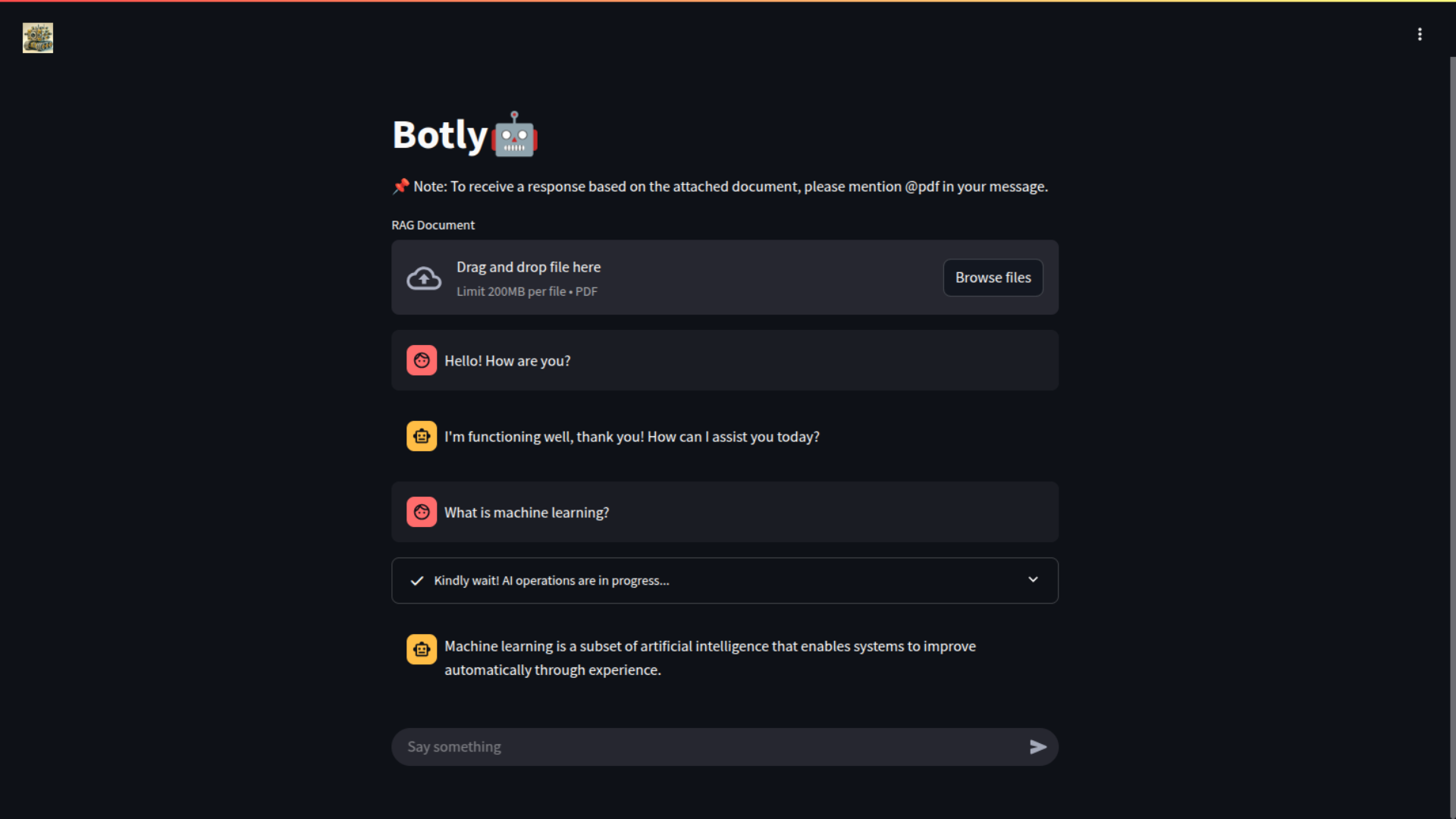
Botly is a chatbot that can read a PDF you give it and answer questions from that document. Everything happens on your own hardware: the language model, the embeddings and the vector search. No API keys, no per-token bills, and your documents never leave your machine.
It has two modes, and you switch between them in the message itself:
- Normal chat. Ask anything, and a local LLM answers.
- Document mode. Start your message with
@pdfand Botly searches the uploaded PDF for the most relevant passages, then answers only from them. It says when the answer isn't in the document.
Source code: github.com/sumit-kumar-03/botly-v3-rag
How it works
Retrieval-Augmented Generation (RAG) means that before asking the model a question, you retrieve the parts of your document that are relevant and put them into the prompt. The model then answers from real text instead of from memory, which cuts down on made-up answers.
            ┌───────────── once, when a PDF is uploaded ─────────────┐
PDF ──▶ pdfplumber ──▶ semantic chunks ──▶ embeddings ──▶ FAISS index
                                                              │
            ┌──────────────── on every "@pdf" question ────────┘
question ──▶ embed ──▶ top-3 similar chunks ──▶ prompt(context + question) ──▶ qwen2.5 (Ollama) ──▶ answer
| Piece | What Botly uses | Why |
|---|---|---|
| LLM | qwen2.5:3b served by Ollama | Small enough for a CPU or a modest GPU, and good at following instructions |
| PDF parsing | pdfplumber (PDFPlumberLoader) | Reliable text extraction, page by page |
| Chunking | LangChain SemanticChunker | Splits where the meaning changes, not every N characters |
| Embeddings | HuggingFace sentence-transformers | Free and local. The default model is all-mpnet-base-v2 |
| Vector search | FAISS (CPU) | Fast in-memory similarity search; returns the top k = 3 chunks |
| Orchestration | LangChain runnables | Prompt → model → parser pipelines ("chains") |
| UI | Streamlit | Chat UI, file upload and session state in about 300 lines of Python |
| Packaging | Docker | Ollama and Streamlit in one image, with one command to run |
Run it in five minutes
All you need is Docker. The first start downloads the model (about 2 GB), so give it a few minutes.
git clone https://github.com/sumit-kumar-03/botly-v3-rag.git
cd botly-v3-rag

docker build -t botly_v3:latest .
docker compose up -d          # or: docker run --dns 8.8.8.8 -p 8501:8501 botly_v3:latest
docker compose logs -f        # wait for "Ollama is up!" and the Streamlit URL
Open http://localhost:8501/botly. The app is served under /botly because .streamlit/config.toml sets
baseUrlPath = "/botly", which makes it easy to put behind a reverse proxy or a tunnel later.
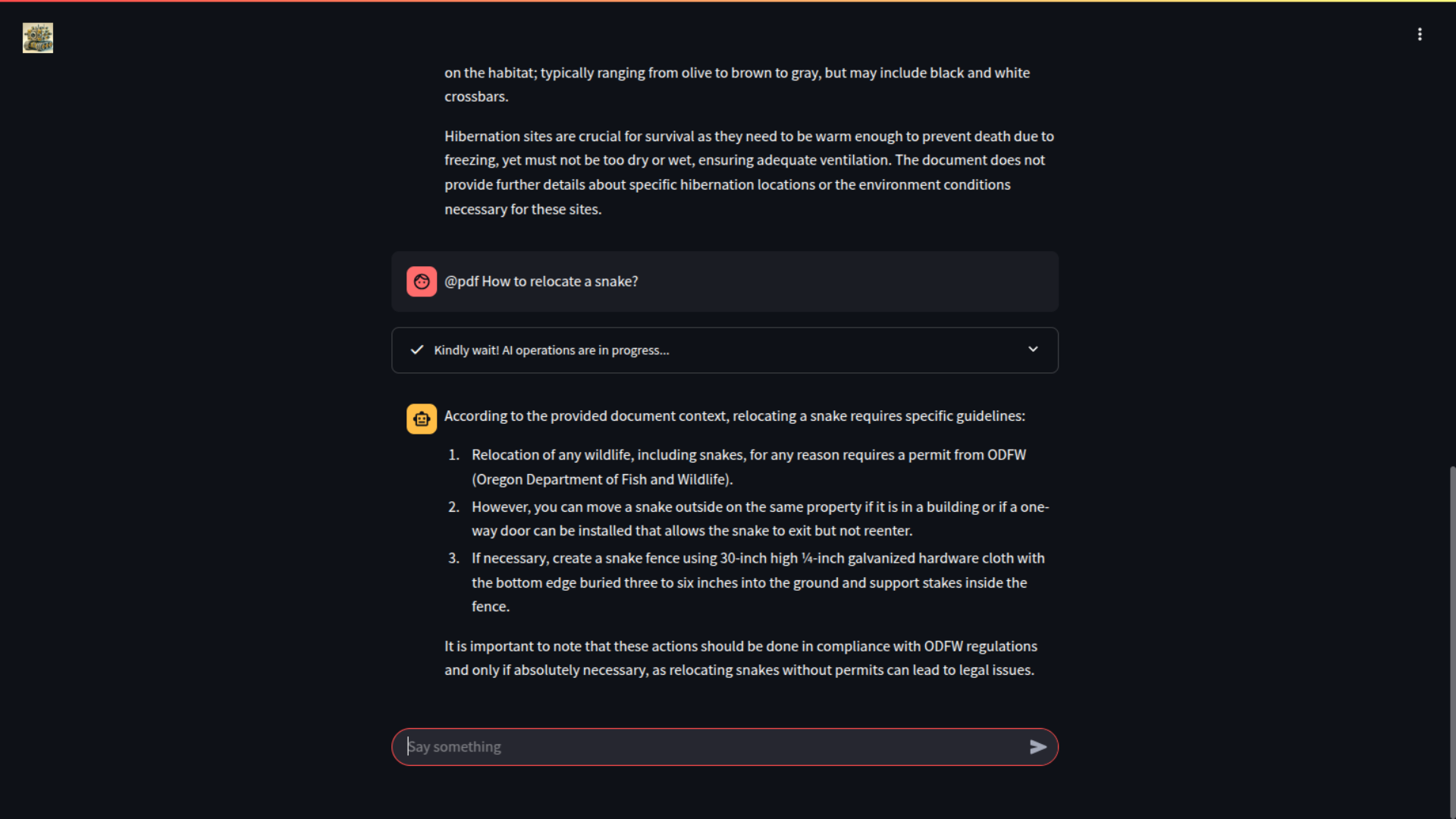
Upload a PDF, wait for "Vector store generated.", then try:
@pdf what are the main points of this document?
Build it yourself, step by step
This section rebuilds Botly from an empty folder, so you understand every piece and can change it.
1. Install Ollama and pull a model
curl -fsSL https://ollama.com/install.sh | sh
ollama serve &                # starts the API on http://localhost:11434
ollama pull qwen2.5:3b
ollama run qwen2.5:3b "Say hi in five words"
If the last command replies, your local LLM works. Any Ollama model will do. Bigger models give better answers but need more RAM or VRAM.
2. Set up Python
Use Python 3.12 and a virtual environment:
mkdir botly && cd botly
python3 -m venv .venv && source .venv/bin/activate
pip install streamlit pdfplumber faiss-cpu \
  langchain-ollama langchain-huggingface langchain-community langchain-experimental \
  sentence-transformers
The repo's requirements.txt pins the exact versions it was built with. Use it if you want identical behaviour.
3. Connect to the model
Create botly.py. ChatOllama wraps the local model, and its settings control how it writes:
from langchain_ollama import ChatOllama

llm = ChatOllama(
    model="qwen2.5:3b",
    base_url="http://localhost:11434",
    temperature=0.8,   # creativity: lower = more deterministic
    top_p=0.9,         # sample from the top 90% probability mass
    top_k=40,          # ...and only the 40 most likely tokens
    num_predict=256,   # max tokens per answer
    keep_alive=300,    # keep the model loaded for 5 minutes between calls
)
4. Write two prompts
One prompt is for normal chat and one is for answering from a document. The document prompt is where you fight hallucinations: tell the model to use only the context, and to say so when the answer isn't there.
from langchain_core.prompts import ChatPromptTemplate

normal_prompt = ChatPromptTemplate.from_messages([
    ("system", "You are a helpful assistant. Always answer as short as possible."),
    ("user", "{input_message}"),
])

rag_prompt = ChatPromptTemplate.from_messages([
    ("system",
     "You are a retrieval-augmented assistant. Answer concisely, quote the document where useful, "
     "say clearly when the answer is not in the context, and never invent facts."),
    ("human",
     "Document Context:\n{context}\n\nQuestion: {question}\n\n"
     "Answer only from the document context. If it doesn't contain the answer, say so."),
])
5. Chain prompt → model → text
LangChain's pipe syntax builds a pipeline. StrOutputParser turns the model's message into a plain string.
from langchain_core.output_parsers import StrOutputParser

normal_chain = normal_prompt | llm | StrOutputParser()
rag_chain = rag_prompt | llm | StrOutputParser()

print(normal_chain.invoke({"input_message": "What is machine learning?"}))
6. Turn a PDF into a searchable index
This is the "retrieval" half of RAG. Load the PDF, split it into chunks by meaning, embed each chunk, and store the vectors in FAISS:
from langchain_community.document_loaders import PDFPlumberLoader
from langchain_experimental.text_splitter import SemanticChunker
from langchain_huggingface import HuggingFaceEmbeddings
from langchain_community.vectorstores import FAISS

embeddings = HuggingFaceEmbeddings()               # downloads the model on first use

pages = PDFPlumberLoader("my-document.pdf").load()
chunks = SemanticChunker(embeddings=embeddings).split_documents(pages)
vector_store = FAISS.from_documents(documents=chunks, embedding=embeddings)
Why semantic chunking? Fixed-size chunks often cut a sentence or an idea in half, so the retriever returns
fragments. SemanticChunker embeds sentences and starts a new chunk where the meaning shifts, so each chunk tends to
hold one complete idea.
7. Retrieve context and answer
For a document question, fetch the 3 most similar chunks, join them into one context string, and run the RAG chain:
retriever = vector_store.as_retriever(search_type="similarity", search_kwargs={"k": 3})

def answer(question: str) -> str:
    if "@pdf" not in question.lower():
        return normal_chain.invoke({"input_message": question})
    docs = retriever.invoke(question)
    context = "\n\n".join(d.page_content for d in docs)
    return rag_chain.invoke({"context": context, "question": question})
The @pdf tag keeps the user in control: normal questions don't pay the cost of retrieval, and document answers stay
tied to what the document actually says.
8. Add the Streamlit UI
Streamlit reruns the whole script on every interaction, so anything that must survive between messages (the chat
history, the bot, the vector store) lives in st.session_state. Put this in botly_ui.py:
import streamlit as st
from botly import Botly          # a small class wrapping steps 3-7

st.set_page_config(page_title="Botly", page_icon=":robot:")

if "botly" not in st.session_state:
    st.session_state.botly = Botly()
    st.session_state.messages = []
    st.session_state.ingested = False

pdf = st.file_uploader("RAG Document", type="pdf")
if pdf and not st.session_state.ingested:
    with open("upload.pdf", "wb") as f:
        f.write(pdf.getvalue())
    with st.spinner("Building the vector store…"):
        st.session_state.botly.ingest("upload.pdf")      # step 6
    st.session_state.ingested = True
    st.success("Vector store generated.")

for m in st.session_state.messages:
    st.chat_message(m["role"]).markdown(m["content"])

if prompt := st.chat_input("Say something"):
    st.chat_message("user").markdown(prompt)
    with st.status("Kindly wait! AI operations are in progress..."):
        reply = st.session_state.botly.answer(prompt)    # step 7
    st.chat_message("assistant").markdown(reply)
    st.session_state.messages += [
        {"role": "user", "content": prompt},
        {"role": "assistant", "content": reply},
    ]
Here ingest() and answer() are this guide's simplified names. In the repo they are
document_consumer() + vector_store_generator() and botly_reply(). Run it with
streamlit run botly_ui.py and open http://localhost:8501.
9. Package it in Docker
Botly ships Ollama and the app in one container. The only tricky part is start-up order: the app must not start
before Ollama is listening. scripts/entrypoint.sh handles that:
#!/bin/bash
ollama serve &                               # 1. start the model server
/usr/src/app/scripts/wait-for-it.sh          # 2. wait until port 11434 accepts connections (60s timeout)
ollama pull qwen2.5:3b                       # 3. make sure the model is present
streamlit run /usr/src/app/botly_ui.py       # 4. start the UI
The Dockerfile, slightly trimmed:
FROM python:3.12
WORKDIR /usr/src/app/
COPY . .
RUN chmod +x scripts/*.sh
RUN apt-get update && apt-get install -y curl lshw procps && rm -rf /var/lib/apt/lists/*
RUN curl -fsSL https://ollama.com/install.sh | sh || true
RUN pip install --no-cache-dir -r requirements.txt
EXPOSE 8501
ENTRYPOINT ["/usr/src/app/scripts/entrypoint.sh"]
docker-compose.yaml adds a port mapping, a public DNS server for downloading the model, and restart: unless-stopped so it comes back after a reboot.
Tuning and ideas
- Better answers: try a bigger model (
qwen2.5:7b,llama3.1:8b), raisekto 4–5 for broader context, or lowertemperaturefor more factual replies. - Faster start-ups: the model is pulled on every container start. Mount a volume at
~/.ollamato keep it between restarts. - GPU: run with
--gpus alland the NVIDIA container toolkit. Ollama uses the GPU automatically. - Several documents: index several PDFs into one FAISS store, and keep each chunk's source in its metadata so answers can cite which file they came from.
- Keep the index:
vector_store.save_local("index")andFAISS.load_local(...)let you skip re-embedding on every upload. - Put it online: it's a plain web app on port 8501 under
/botly, so a Cloudflare Tunnel can publish it from the same machine without opening any ports.
Connected
shares a topic with this projectSentinel Sidecar: a learning security layer for any HTTP service
A security sidecar you put in front of any HTTP service. OWASP rules and small ML models decide each request in about a millisecond, and an out-of-band LLM analyst turns what it learns into short-lived blocks.
Streamlit Portfolio Template
A portfolio and resume website written entirely in Python. Edit one data file, run one command, and you have a dark-themed, animated personal site with a working contact form.
Host a website from your own machine with Cloudflare Tunnel
Move your domain to Cloudflare, create a tunnel, and serve apps running on your own hardware without opening a single port.
AppSec scanner suite: six scanners, one interface
SAST, DAST, SCA, SBOM, CSPM and secret detection, each wrapping a proven open-source scanner behind the same command line, the same Docker packaging and the same JSON output.
CVE Trove: a vulnerability intelligence pipeline
Pulls 15 public vulnerability feeds on a schedule, merges them into one record per CVE, and streams the result into MongoDB through Celery workers.